
Comparing the best ISF Filing Software of 2026 includes 1. CargoEZ 2. Descartes 3. CargoWise 4. CustomsCity 5. Artemus 6. Infox 7. Trade Tech 8. iCustoms.
TL;DR
- CargoEZ: best overall for forwarders that want ISF filing inside their operations system. AMS, ISF, and customs entry sit in the same platform as air and ocean file management, so bill data flows into the ISF without re-keying. G2 rates it 4.8/5 across 40 reviews.
- Descartes: best for high-volume compliance teams. Descartes ISF Connect rides the Global Logistics Network, and the wider Descartes customs suite is the most reviewed compliance product in this set on G2.
- CargoWise: best for multinational forwarders already on the platform. Native ACE, ABI, and ISF on one data model, though Capterra sits at 2.9/5 and implementation runs 6 to 12 months.
- CustomsCity: best pure-play filing platform. One portal for ABI, AMS, ACAS, ISF-10, Section 321, and FDA PN on a pay-per-transaction model, listed on the CBP ABI vendor list.
- Artemus: best low-cost self-file portal. A web ISF 10+2 application running since 2008 for importers, NVOCCs, and ocean carriers that file their own.
An ISF is ten data elements, a hard deadline of 24 hours before vessel loading, and a $5,000 liquidated-damages claim if it is late, wrong, or missing. This comparison ranks eight tools that transmit Importer Security Filings to CBP through ACE, covering pure-play ISF portals, customs-compliance platforms, and the ISF modules inside forwarding suites. The focus is on what actually keeps a filing clean: how each tool handles bill-of-lading matching, ISF-5 versus ISF-10, bond obligations, CBP rejections, and status reconciliation back to your file. Pricing is quote-based across the category, so the notes below record the model rather than a headline number. CargoEZ leads for freight forwarders and NVOCCs that want ISF-10 and ISF-5 filing integrated into the ocean import file alongside operations and accounting.
What is ISF filing software?
ISF filing software collects the Importer Security Filing data set, formats it to CBP specification, and transmits it to Customs and Border Protection through the ACE portal, then returns an accept, reject, or replace status to the filer.
For a standard ocean import the filing is ISF-10, which pairs ten importer and supply-chain data elements with two carrier elements. For freight remaining on board, transshipments, and a few other movements it is the shorter ISF-5. Tools differ on whether they cover both, whether they match the ISF to the bill of lading automatically, how they surface CBP rejections, and whether they run standalone or inside a forwarding platform.
Best ISF Filing Software comparison: features, pricing and verdicts
| Tool | Best for | Starting price | Free trial | External rating |
|---|---|---|---|---|
ISF filing built into the forwarding file, not bolted onto it | Custom quote | Free demo | G2 4.8/5 (40 reviews) | |
ISF transmission on the Global Logistics Network for compliance-led teams | Custom quote | Demo only | No public reviews | |
Native ISF on the same data model as the rest of your customs and forwarding | Custom quote | Demo only | G2 4.3/5 (35 reviews) | |
One pay-per-transaction portal for ISF, ABI, AMS, ACAS, and Section 321 | Per-filing fee | Free demo | No public reviews | |
A web ISF 10+2 portal running since 2008 for self-filers | Per-filing fee | Free demo | No public reviews | |
ISF and AMS filing from a long-tenured US customs software vendor | Custom quote | Contact sales | No public reviews | |
Ocean AMS and ISF filing for NVOCCs and forwarders on a cloud portal | Per-filing fee | Free demo | No public reviews | |
AI document extraction feeding ISF and customs data capture | Custom quote | Free demo | No public reviews |
How we chose these tools
This ranking is built from primary sources rather than vendor marketing. The starting point is the CBP ABI Software Vendors list and the CBP ISF 10+2 penalty and mitigation guidelines, checked in August 2026, which establish which tools are certified to transmit and how CBP treats a late or inaccurate filing. On top of that we read G2 and Capterra product pages for the vendors that have a review presence, and vendor documentation for the pure-play customs tools that do not. Pricing across this category is quote-based or per-filing, so each card records the pricing model and any published entry point rather than a single number. Broker-only desktop suites closed to new customers, denied-party screening tools with no ISF transmission, and general TMS platforms without a customs module are out of scope.
Read the full CEOPickz.com testing methodology, the scoring criteria, weights, and the data we collect for every tool.
Detailed reviews
What's great
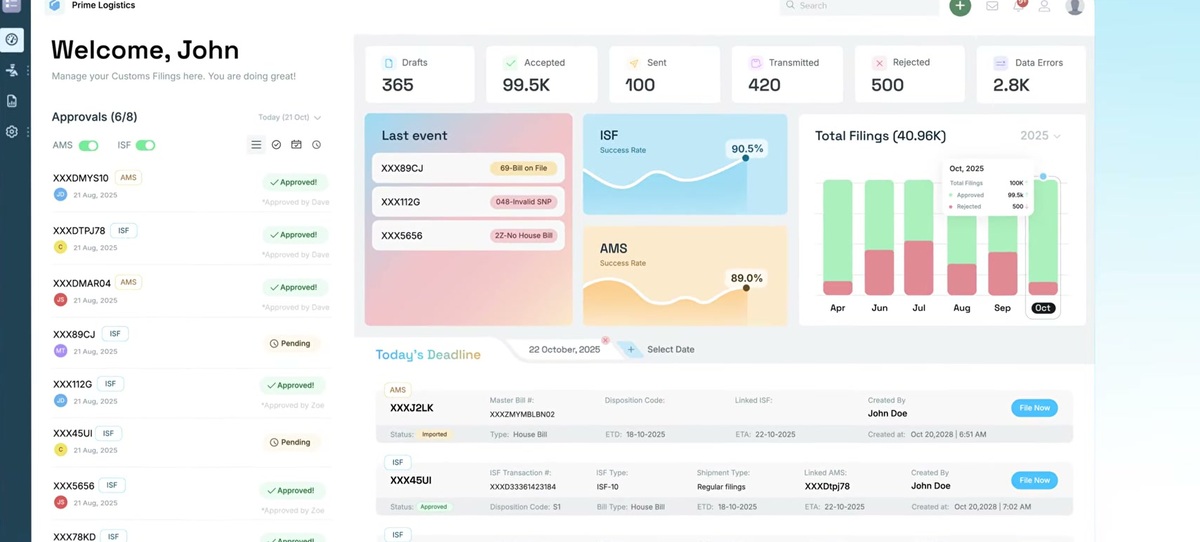
- ISF, AMS, and customs entry live in the same cloud system as air and ocean operations, so the house bill, consignee, and container data populate the ISF without a second data entry pass
- Denied-party screening and customs filing are part of the platform, which removes the bridge software most forwarders run between their TMS and their filer
- Multi-currency invoicing and the customer portal sit under the same login, and implementations are measured in weeks
Watch-outs
- The 40-review G2 base is small next to the incumbents, so third-party validation is thinner
- Pricing is quote-only with no public per-filing or per-seat number
- ISF is one module of a broad suite, so a pure self-filing importer with no forwarding operations is buying more than it needs
CargoEZ, from AVOW Solutions, is the pick when the ISF is a step in a shipment file you are already managing rather than a standalone task. Because operations, customs filing , and accounting share one database, the ISF-10 draws its data from the booking and the bill of lading instead of a spreadsheet re-key, which is where most inaccurate filings start.
Its 40 G2 reviews average 4.8/5, with recurring notes on fast onboarding and responsive support. The review base is shallow, and there is no published pricing, so you commit to a demo before you can compare cost.
For a US forwarder or NVOCC filing dozens to hundreds of ISFs a month alongside AMS and entries, the single-system approach cuts both the error rate and the license count. A pure importer that only needs to self-file will find it heavier than a web portal.
Best for forwarders and NVOCCs that want ISF, AMS, and customs entry in the same system as the shipment file. Wrong for a self-filing importer with no forwarding operations to run.
Pricing breakdown
| Plan | Price | Best for |
|---|---|---|
| Compliance module | Custom quote | Forwarders adding AMS, ISF, and customs to the operations core |
| FMS + Compliance | Custom quote | US NVOCCs running operations and US filing on one platform |
| Full suite | Custom quote | Forwarders adding WMS, CRM, and multi-currency accounting |
Security & compliance
| Standard | Availability |
|---|---|
| Ace abi certified | Yes |
| Audit logs | Yes |
| Bond handling | Continuous or single-entry |
| Isf5 support | Yes |
| Penalty workflow | ✓ (reject and replace tracked) |
CargoEZ compliance summary: ace abi certified is yes, Audit logs is yes, bond handling is continuous or single-entry, isf5 support is yes, and penalty workflow is ✓ (reject and replace tracked).
Key integrations
| Integration | Type |
|---|---|
| Gmail | N/A |
| Outlook | N/A |
| Slack | N/A |
| LinkedIn Sales Navigator | N/A |
| Outreach / Salesloft | N/A |
CargoEZ integration summary: Gmail is not specified, Outlook is not specified, Slack is not specified, LinkedIn Sales Navigator is not specified, and Outreach or Salesloft is not specified.
Feature availability
| Feature | Status |
|---|---|
| Bol match | ✓ (from booking) |
| Bulk edi upload | ✓ |
| Isf5 filing | ✓ |
| Rejection handling | ✓ |
| Self file portal | ✓ |
CargoEZ feature availability summary: Bol match (✓ (from booking)), Bulk edi upload (✓), Isf5 filing (✓), Rejection handling (✓), and Self file portal (✓).
Loading reviews…
What's great
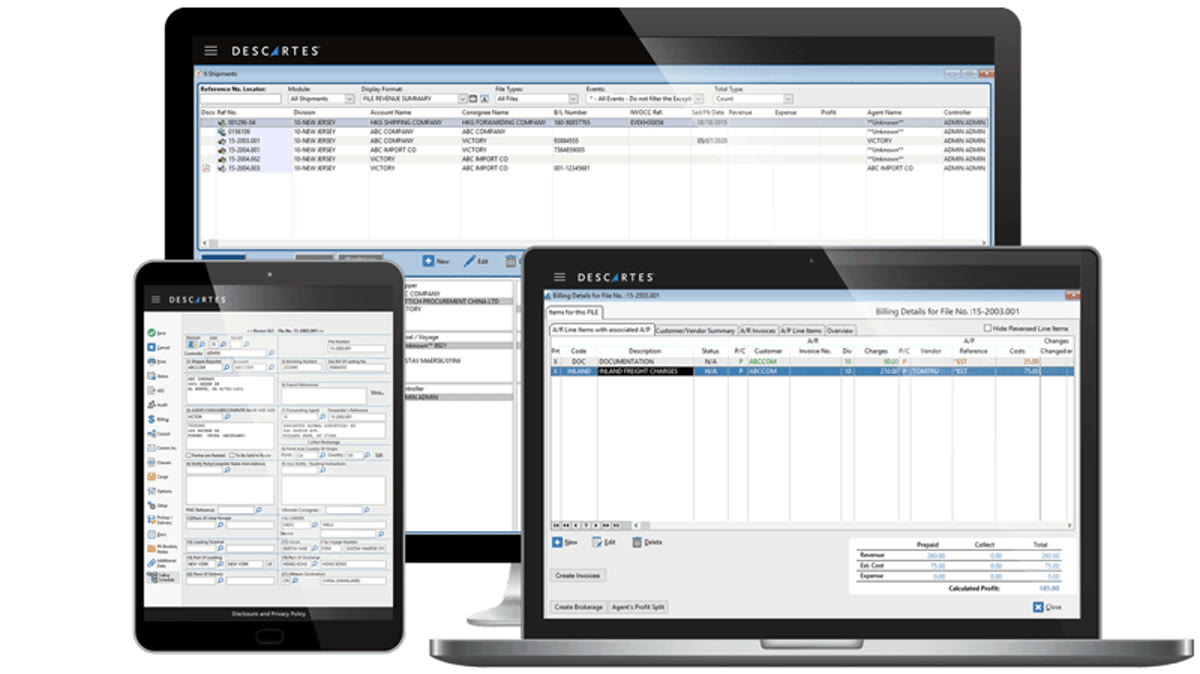
- ISF Connect lets you assemble the ISF data set in your own system and hand transmission plus status messaging to Descartes over an established CBP connection
- Sits next to denied-party screening, HS classification, and ACE entry from a vendor whose whole identity is trade compliance
- The wider customs suite has the deepest third-party review presence of any pure compliance product here, and recent G2 notes cite document-capture that turns unstructured docs into filing data
Watch-outs
- The interface is repeatedly described as dated, with slow UX change across years of ownership
- Enterprise pricing and a real implementation, so it is oversized for a small filer
- ISF Connect is a transmission layer, so you still need the system that builds the data set
Descartes is the option for a team where a misfiled entry, not throughput, is the thing that keeps someone up at night. Descartes ISF Connect rides the Descartes Global Logistics Network, so you gather the ten data elements wherever they live and Descartes handles the CBP conversation and posts the accept or reject status back.
The broader Descartes Customs & Compliance Suite on G2 is the most-reviewed compliance product in this comparison, and reviewers credit the support and the error reduction while flagging the aging interface.
This is enterprise tooling with an enterprise price and setup, and it assumes you have or are buying the surrounding customs stack. A shop filing a few ISFs a week will not get the return.
Best for high-volume forwarders and brokers that want ISF transmission inside a full compliance program. Wrong for a small importer that needs one cheap portal.
Pricing breakdown
| Plan | Price | Best for |
|---|---|---|
| ISF Connect | Custom quote (transaction-based) | Teams that build the ISF data set in-house and outsource transmission |
| Customs & Compliance Suite | Custom quote | Brokers and forwarders adding entry, screening, and classification |
| Global Logistics Network add-ons | Custom quote | Carrier connectivity and messaging across modes |
Security & compliance
| Standard | Availability |
|---|---|
| Ace abi certified | Yes |
| Audit logs | Yes |
| Bond handling | Supported via broker of record |
| Isf5 support | Yes |
| Penalty workflow | ✓ (status messaging and reject tracking) |
Descartes compliance summary: ace abi certified is yes, Audit logs is yes, bond handling is supported via broker of record, isf5 support is yes, and penalty workflow is ✓ (status messaging and reject tracking).
Key integrations
| Integration | Type |
|---|---|
| Gmail | N/A |
| Outlook | N/A |
| Slack | N/A |
| LinkedIn Sales Navigator | N/A |
| Outreach / Salesloft | N/A |
Descartes integration summary: Gmail is not specified, Outlook is not specified, Slack is not specified, LinkedIn Sales Navigator is not specified, and Outreach or Salesloft is not specified.
Feature availability
| Feature | Status |
|---|---|
| Bol match | M (host-supplied) |
| Bulk edi upload | ✓ |
| Isf5 filing | ✓ |
| Rejection handling | ✓ |
| Self file portal | M |
Descartes feature availability summary: Bol match (M (host-supplied)), Bulk edi upload (✓), Isf5 filing (✓), Rejection handling (✓), and Self file portal (M).
Loading reviews…
What's great
- Native US ACE, ABI, and ISF transmission on the same database as air, ocean, customs entry, and warehouse, so an import file feeds the ISF with no interface
- One workflow across dozens of country customs regimes, which matters when a shipment touches several before it clears US waters
- WiseTech Global's scale funds continued heavy investment in the customs modules
Watch-outs
- Capterra sits at 2.9/5, with support scored near 1.9/5 by reviewers there
- Implementation typically runs 6 to 12 months and needs trained internal resources
- The December 2025 Value Pack repricing raised many customers' costs 20 to 50 percent
CargoWise, from WiseTech Global, makes sense for ISF when you are already running the platform for forwarding and entry. The ISF is not a separate tool, it is a transaction on the same file as the customs declaration , so consignee, seller, and container data are already present and matched to the bill of lading.
On G2 it holds 4.3/5 across 35 reviews , but Capterra tells a harder story at 2.9/5 , where support and pricing opacity draw the loudest complaints. The 2025 Value Pack change pushed many bills up 20 to 50 percent.
Buying CargoWise only to file ISFs is not the move. It earns its place when the surrounding volume and jurisdictional spread already justify the platform.
Best for multinational forwarders standardized on CargoWise who want ISF as one more native transaction. Wrong for a US-only shop under a few hundred shipments a month.
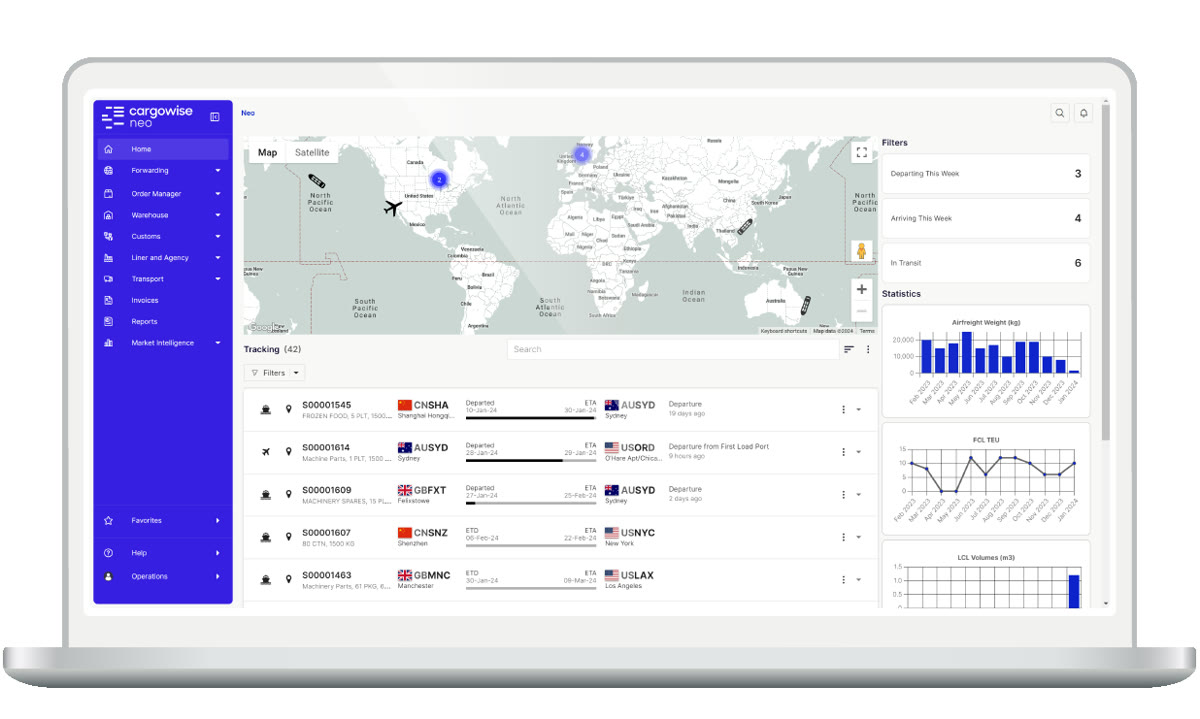
Screenshots of CargoWise 3 images
Pricing breakdown
| Plan | Price | Best for |
|---|---|---|
| Value Pack (entry) | Custom quote | Single-country forwarders on the bundled model |
| Value Pack (growth) | Custom quote | Multi-branch forwarders adding customs and warehouse |
| Enterprise | Custom (six-figure annual typical) | Multinational forwarders across many customs regimes |
Security & compliance
| Standard | Availability |
|---|---|
| Ace abi certified | ✓ (native) |
| Audit logs | Yes |
| Bond handling | Continuous or single-entry |
| Isf5 support | Yes |
| Penalty workflow | ✓ (reject and replace on file) |
CargoWise compliance summary: ace abi certified is ✓ (native), Audit logs is yes, bond handling is continuous or single-entry, isf5 support is yes, and penalty workflow is ✓ (reject and replace on file).
Key integrations
| Integration | Type |
|---|---|
| Gmail | N/A |
| Outlook | N/A |
| Slack | N/A |
| LinkedIn Sales Navigator | N/A |
| Outreach / Salesloft | N/A |
CargoWise integration summary: Gmail is not specified, Outlook is not specified, Slack is not specified, LinkedIn Sales Navigator is not specified, and Outreach or Salesloft is not specified.
Feature availability
| Feature | Status |
|---|---|
| Bol match | ✓ (from entry file) |
| Bulk edi upload | ✓ |
| Isf5 filing | ✓ |
| Rejection handling | ✓ |
| Self file portal | M |
CargoWise feature availability summary: Bol match (✓ (from entry file)), Bulk edi upload (✓), Isf5 filing (✓), Rejection handling (✓), and Self file portal (M).
Loading reviews…
What's great
- A single web platform covers ISF-10, ABI, ACE, AMS, ACAS, FDA Prior Notice, Type 11, 7512, and the Section 321 Data Pilot, so a forwarder can file everything from one login
- Pay-per-transaction pricing with no seat licenses suits filers with uneven monthly volume
- Browser-based with EDI upload options, so it connects to a host TMS or runs standalone
Watch-outs
- No third-party review footprint, so you are relying on references and the trial rather than public feedback
- The interface is functional rather than modern
- Pure filing tool with no forwarding operations, accounting, or CRM around it
CustomsCity is the closest thing here to a neutral filing utility. Its ISF-10 product is one module on a platform that also does ABI, AMS, ACAS, FDA Prior Notice, and Section 321, which is a strong fit for a forwarder or NVOCC that wants every CBP transmission in one place without buying a suite.
It is a certified vendor on the CBP ABI Software Vendors list , and pricing is per filing rather than per seat, so a filer whose volume swings month to month is not paying for idle licenses.
The trade-off is no public review base and a plain interface. You validate this one through a reference call and a hands-on trial.
Best for forwarders and NVOCCs that want all CBP filings on one pay-per-transaction platform. Wrong for buyers who need a public review track record before signing.
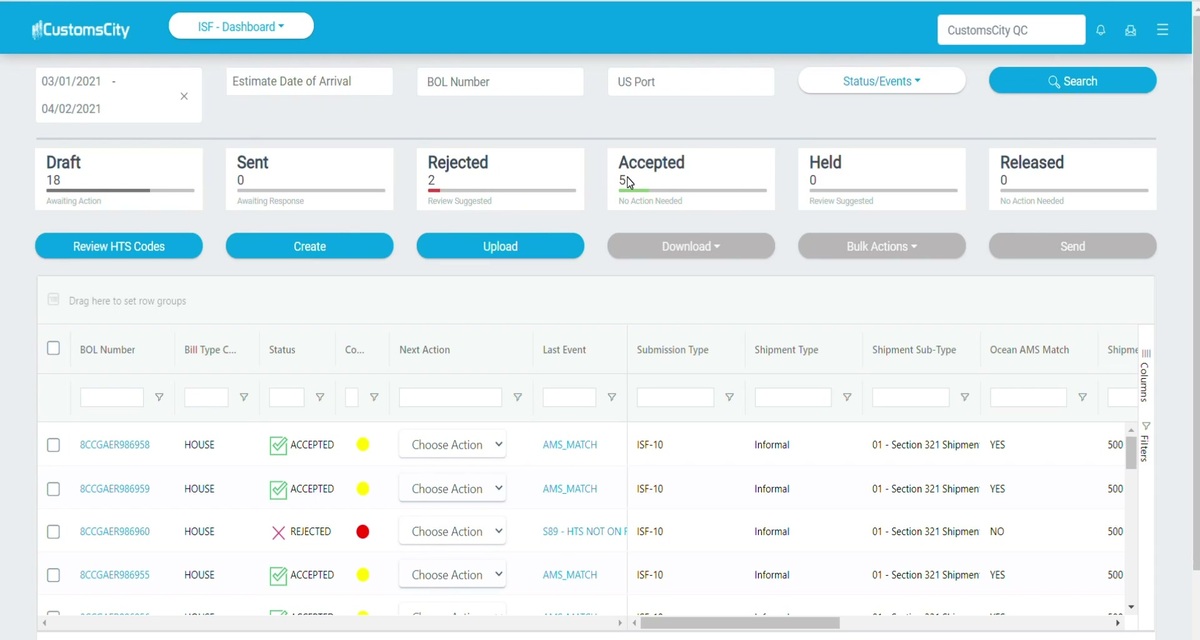
Screenshots of CustomsCity 5 images
Pricing breakdown
| Plan | Price | Best for |
|---|---|---|
| ISF-10 filing | Per-filing fee (quote) | Forwarders and NVOCCs filing ISF only |
| Multi-service platform | Per-transaction (quote) | Adding ABI, AMS, ACAS, and FDA PN on one login |
| EDI integration | Custom quote | Connecting a host TMS to CustomsCity transmission |
Security & compliance
| Standard | Availability |
|---|---|
| Ace abi certified | Yes |
| Audit logs | Yes |
| Bond handling | Single-entry or continuous |
| Isf5 support | Marketplace add-on |
| Penalty workflow | ✓ (accept and reject messaging) |
CustomsCity compliance summary: ace abi certified is yes, Audit logs is yes, bond handling is single-entry or continuous, isf5 support is marketplace add-on, and penalty workflow is ✓ (accept and reject messaging).
Key integrations
| Integration | Type |
|---|---|
| Gmail | N/A |
| Outlook | N/A |
| Slack | N/A |
| LinkedIn Sales Navigator | N/A |
| Outreach / Salesloft | N/A |
CustomsCity integration summary: Gmail is not specified, Outlook is not specified, Slack is not specified, LinkedIn Sales Navigator is not specified, and Outreach or Salesloft is not specified.
Feature availability
| Feature | Status |
|---|---|
| Bol match | M |
| Bulk edi upload | ✓ |
| Isf5 filing | M |
| Rejection handling | ✓ |
| Self file portal | ✓ |
CustomsCity feature availability summary: Bol match (M), Bulk edi upload (✓), Isf5 filing (M), Rejection handling (✓), and Self file portal (✓).
Loading reviews…
What's great
- Built specifically for ISF 10+2 self-filing by importers, buyers, forwarders, NVOCCs, and ocean carriers, so the workflow is narrow and quick to learn
- In market since 2008, so the filing logic and CBP messaging are well worn
- Low entry cost relative to the compliance suites, with per-filing or small subscription options
Watch-outs
- No third-party review presence, so due diligence rests on references
- Narrow scope, so it does not grow into entry filing or forwarding operations
- Interface and reporting are basic
Artemus is a focused answer to one question: how does an importer or NVOCC file its own ISF without buying a platform. The Artemus ISF web application has been compliant with the 10+2 rule since the rule took effect, and it lets the filing party key or upload the data set and transmit directly.
There is no public review base, so this is a reference-and-trial decision. What you get for the low price is a tool that does ISF and stops there, which is exactly right for a company that files a modest, steady number each month.
Best for self-filing importers and small NVOCCs that want a cheap, single-purpose ISF portal. Wrong for a forwarder that also needs entry filing, AMS, and operations in the same tool.

Pricing breakdown
| Plan | Price | Best for |
|---|---|---|
| Per-filing | Per-ISF fee (quote) | Importers filing occasional ISFs |
| Subscription | Low monthly (quote) | NVOCCs and forwarders with steady monthly volume |
| Service center | Custom quote | Parties filing on behalf of multiple clients |
Security & compliance
| Standard | Availability |
|---|---|
| Ace abi certified | Yes |
| Audit logs | Marketplace add-on |
| Bond handling | Single-entry ISF bond available |
| Isf5 support | Marketplace add-on |
| Penalty workflow | ✓ (accept and reject status) |
Artemus compliance summary: ace abi certified is yes, Audit logs is marketplace add-on, bond handling is single-entry isf bond available, isf5 support is marketplace add-on, and penalty workflow is ✓ (accept and reject status).
Key integrations
| Integration | Type |
|---|---|
| Gmail | N/A |
| Outlook | N/A |
| Slack | N/A |
| LinkedIn Sales Navigator | N/A |
| Outreach / Salesloft | N/A |
Artemus integration summary: Gmail is not specified, Outlook is not specified, Slack is not specified, LinkedIn Sales Navigator is not specified, and Outreach or Salesloft is not specified.
Feature availability
| Feature | Status |
|---|---|
| Bol match | ✗ |
| Bulk edi upload | ✓ |
| Isf5 filing | M |
| Rejection handling | ✓ |
| Self file portal | ✓ |
Artemus feature availability summary: Bol match (✗), Bulk edi upload (✓), Isf5 filing (M), Rejection handling (✓), and Self file portal (✓).
Loading reviews…
What's great
- Long-standing US customs filing vendor with ISF, sea and air AMS, and ABI on one stack, aimed at NVOCCs and forwarders
- Managed-service option where Info-X staff file on your behalf, useful for lean back offices
- Handles the ISF-to-manifest link that ocean NVOCCs care about
Watch-outs
- No public review footprint, so validation is references plus trial
- Positioning leans toward outsourced processing, which not every filer wants
- Interface and self-service reporting trail the modern suites
Info-X, marketed as Infox, is a back-office customs vendor rather than a self-service app, and that framing is the point. For an ocean NVOCC that files sea AMS and needs the ISF matched to the same manifest , running both through one vendor removes a reconciliation step.
It appears on the CBP ABI Software Vendors list , and it offers a managed option where its team does the filing, which suits a small operation without a dedicated compliance desk. There is no public review base, so treat references as essential.
Best for ocean NVOCCs that want ISF and AMS filed together, in-house or managed. Wrong for teams that want a slick self-service portal with public reviews.
Pricing breakdown
| Plan | Price | Best for |
|---|---|---|
| Software license | Custom quote | NVOCCs filing ISF and AMS in-house |
| Managed filing | Per-transaction (quote) | Lean back offices outsourcing transmission |
| ABI add-on | Custom quote | Brokers adding entry filing |
Security & compliance
| Standard | Availability |
|---|---|
| Ace abi certified | Yes |
| Audit logs | Marketplace add-on |
| Bond handling | Single-entry or continuous |
| Isf5 support | Marketplace add-on |
| Penalty workflow | ✓ (status and reject handling) |
Infox compliance summary: ace abi certified is yes, Audit logs is marketplace add-on, bond handling is single-entry or continuous, isf5 support is marketplace add-on, and penalty workflow is ✓ (status and reject handling).
Key integrations
| Integration | Type |
|---|---|
| Gmail | N/A |
| Outlook | N/A |
| Slack | N/A |
| LinkedIn Sales Navigator | N/A |
| Outreach / Salesloft | N/A |
Infox integration summary: Gmail is not specified, Outlook is not specified, Slack is not specified, LinkedIn Sales Navigator is not specified, and Outreach or Salesloft is not specified.
Feature availability
| Feature | Status |
|---|---|
| Bol match | N (to AMS manifest) |
| Bulk edi upload | ✓ |
| Isf5 filing | M |
| Rejection handling | ✓ |
| Self file portal | M |
Infox feature availability summary: Bol match (N (to AMS manifest)), Bulk edi upload (✓), Isf5 filing (M), Rejection handling (✓), and Self file portal (M).
Loading reviews…
What's great
- Cloud portal that pairs ocean AMS manifest filing with ISF, so an NVOCC files both against the same house and master bill data
- Per-transaction pricing with volume tiers, which keeps cost tied to shipment count
- Rate management and booking modules available if you want to grow the footprint later
Watch-outs
- No public review presence, so references and a trial carry the weight
- Air-side and non-ocean scope is thin
- Reporting and dashboards are basic next to the enterprise suites
Trade Tech is an ocean-first filing platform. For an NVOCC the appeal is that the AMS manifest and the ISF share bill-of-lading data in one system, so the two filings stay consistent and the ISF-to-manifest match is not a manual check.
It is a certified CBP vendor, priced per transaction with volume breaks, so a growing NVOCC scales cost with volume rather than paying a flat platform fee. Public reviews are absent, so a reference call and a hands-on ISF test during the trial are the real diligence.
Best for ocean NVOCCs and forwarders that file AMS and ISF together and want per-shipment pricing. Wrong for air-heavy filers or anyone who needs a broad review trail.
Pricing breakdown
| Plan | Price | Best for |
|---|---|---|
| ISF filing | Per-filing fee (quote) | NVOCCs filing ISF only |
| AMS + ISF | Per-transaction with volume tiers | Ocean NVOCCs filing manifest and ISF together |
| Rate and booking add-ons | Custom quote | Forwarders extending into quoting and booking |
Security & compliance
| Standard | Availability |
|---|---|
| Ace abi certified | Yes |
| Audit logs | Marketplace add-on |
| Bond handling | Single-entry or continuous |
| Isf5 support | Marketplace add-on |
| Penalty workflow | ✓ (accept and reject messaging) |
Trade Tech compliance summary: ace abi certified is yes, Audit logs is marketplace add-on, bond handling is single-entry or continuous, isf5 support is marketplace add-on, and penalty workflow is ✓ (accept and reject messaging).
Key integrations
| Integration | Type |
|---|---|
| Gmail | N/A |
| Outlook | N/A |
| Slack | N/A |
| LinkedIn Sales Navigator | N/A |
| Outreach / Salesloft | N/A |
Trade Tech integration summary: Gmail is not specified, Outlook is not specified, Slack is not specified, LinkedIn Sales Navigator is not specified, and Outreach or Salesloft is not specified.
Feature availability
| Feature | Status |
|---|---|
| Bol match | N (to AMS manifest) |
| Bulk edi upload | ✓ |
| Isf5 filing | M |
| Rejection handling | ✓ |
| Self file portal | ✓ |
Trade Tech feature availability summary: Bol match (N (to AMS manifest)), Bulk edi upload (✓), Isf5 filing (M), Rejection handling (✓), and Self file portal (✓).
Loading reviews…
What's great
- AI document extraction pulls shipper, consignee, and commodity data off commercial documents, which cuts the keying that causes inaccurate ISFs
- Module-based platform spanning classification, declaration, and filing, so ISF is part of a wider automation story
- Modern interface and API-first design compared with the legacy US filers
Watch-outs
- Younger in the US customs market, with a thin ISF-specific track record
- Very little independent review evidence
- UK and EU roots, so US ACE and ISF depth needs close checking in the trial
iCustoms is the AI-forward entry on this list. The pitch is that document extraction reads the data off the invoice, packing list, and bill of lading and pre-fills the ISF, so a filer reviews and submits rather than types.
That is genuinely useful, since keystroke errors are a common source of the inaccurate filings CBP penalizes. The caution is maturity: iCustoms is newer to US ISF than Descartes or CustomsCity, and independent review evidence is scarce. Pressure-test ACE transmission, ISF-5, and rejection handling in the trial before you rely on it.
Best for forwarders that want AI data capture in front of their ISF workflow and will validate the US filing depth themselves. Wrong for a team that needs a proven, heavily reviewed US filer today.
Pricing breakdown
| Plan | Price | Best for |
|---|---|---|
| Data capture | Custom quote | Teams adding AI extraction ahead of an existing filer |
| Filing module | Custom quote | Forwarders filing ISF and declarations on iCustoms |
| Platform | Custom quote | Classification, declaration, and filing on one system |
Security & compliance
| Standard | Availability |
|---|---|
| Ace abi certified | M (confirm in trial) |
| Audit logs | Yes |
| Bond handling | Via broker of record |
| Isf5 support | Marketplace add-on |
| Penalty workflow | Marketplace add-on |
iCustoms compliance summary: ace abi certified is m (confirm in trial), Audit logs is yes, bond handling is via broker of record, isf5 support is marketplace add-on, and penalty workflow is marketplace add-on.
Key integrations
| Integration | Type |
|---|---|
| Gmail | N/A |
| Outlook | N/A |
| Slack | N/A |
| LinkedIn Sales Navigator | N/A |
| Outreach / Salesloft | N/A |
iCustoms integration summary: Gmail is not specified, Outlook is not specified, Slack is not specified, LinkedIn Sales Navigator is not specified, and Outreach or Salesloft is not specified.
Feature availability
| Feature | Status |
|---|---|
| Bol match | N (AI extraction) |
| Bulk edi upload | ✓ |
| Isf5 filing | M |
| Rejection handling | M |
| Self file portal | ✓ |
iCustoms feature availability summary: Bol match (N (AI extraction)), Bulk edi upload (✓), Isf5 filing (M), Rejection handling (M), and Self file portal (✓).
Loading reviews…
Tools we considered but excluded
We evaluated more tools than the 8 you see above. These did not make the cut. Saying what we rejected, and why, is the editorial muscle most listicles skip.
- SmartBorder: Strong ISF and ABI web tooling, but as of February 2025 the vendor stopped selling its customs software to new brokerage firms and centralized on parent Livingston International, so it is not a viable new purchase for most forwarders; noted in Also considered
- Magaya: Files ABI and ISF inside its forwarding and warehouse suite, but it is a full operations platform rather than an ISF tool, and is covered in the freight management comparison
- GoFreight: Includes ISF and AMS filing within its cloud TMS, but the ISF is a feature of a forwarding system, not a standalone filer; noted in Also considered
- Descartes Denied Party Screening: Screening product with no ISF transmission, so it does not belong in a filing-tool ranking
- e2open Global Trade: Enterprise trade platform aimed at large shippers and manufacturers rather than forwarder and NVOCC ISF filing
Honorable mentions
Solid tools that did not crack the main list but are worth tracking, especially for niche use cases.
- SmartBorder: If you are an existing SmartBorder or Livingston customer, the ISF service center module and its link to the ABI application remain solid; just not open to most new buyers
- GoFreight: For a US mid-market forwarder that wants ISF filing to live inside a modern cloud TMS rather than a separate portal
- Magaya: For SMB forwarders with warehouse operations that want ISF, ABI, and WMS from one vendor
What goes wrong when ISF filing is a manual process
The ISF is deceptively small. Ten data elements, two more from the carrier, one deadline. It looks like something a coordinator can handle from a spreadsheet, and for a while it is.
The failure shows up at volume. A container gets rolled, the bill of lading number changes, and nobody re-transmits the ISF update. A consignee address is keyed with a transposed digit. A house bill is split and the second ISF never gets filed.
Each of those is a separate $5,000 liquidated-damages exposure. CBP treats a late filing, an inaccurate filing, and a missing filing as three flavors of the same violation, and since the three-strikes practice ended, the first one can generate a claim.
Software earns its cost here by removing the keystroke. When the ISF pulls its data from the booking and the bill of lading, and when the tool flags a filing that has not been updated after the bill changed, the error rate drops. That is the whole business case.
ISF-5 versus ISF-10, and which filer you are
Most US ocean imports need the ISF-10: five party elements about the importer and supplier, five supply-chain elements, plus the vessel stow plan and container status messages from the carrier. This is the filing every tool in this list handles.
The ISF-5 is the shorter version for cargo that is freight remaining on board, moving in-transit through the US, or being transshipped. It carries five elements and is the responsibility of the carrier or the party causing the goods to move.
Why it matters for tool choice: several pure-play portals treat ISF-5 as a secondary case with lighter support. If your NVOCC handles transshipment or FROB cargo, confirm ISF-5 is a first-class workflow, not a checkbox.
The other split is who transmits. A self-filing importer files under its own bond. A forwarder or NVOCC often files as agent. A customs broker files through its ABI system. The tools below sit at different points on that line, and CargoEZ, CargoWise, and Descartes assume you are an agent or broker rather than a single importer.
How ISF penalties actually get assessed and mitigated
The number everyone quotes is $5,000. The number you are more likely to pay is lower, and knowing the mechanics changes how you evaluate software.
The claim. When CBP identifies a late, inaccurate, or missing ISF, the port issues a liquidated-damages claim for $5,000 per violation, up to $10,000 for multiple violations on the same filing. Ports are now directed to issue these within 90 days of learning of the problem, and the informal three-strikes tolerance that many filers relied on is gone.
First-time mitigation. Per the CBP penalty guidelines, a first liquidated-damages claim for a late or inaccurate ISF or ISF update can be cancelled on payment of $1,000 to $2,000, depending on aggravating and mitigating factors, if CBP concludes that law-enforcement goals were not compromised. A subsequent claim can be cancelled for $2,500 on the same finding.
C-TPAT relief. Members of C-TPAT receive up to an additional 50 percent mitigation on ISF claims. If your company is in the program, that is a real lever in a petition.
What software changes. No tool waives a penalty. What the better tools do is give you the evidence a mitigation petition needs: a timestamped transmission log, the CBP accept or reject message, the bill-of-lading match at the time of filing, and the update history. When you are arguing that a filing was timely and that any inaccuracy was immaterial, that audit trail is the case. Tools that keep a clean reject-and-replace history, such as CargoEZ, CargoWise, and Descartes, make the petition writing itself. Tools that only show current status leave you reconstructing events from email.
The practical takeaway: weight the penalty-evidence workflow in your trial as heavily as the filing screen. You will use the filing screen daily and the audit trail on the worst day of the quarter.
Native ACE and ABI filing versus a bolt-on bridge
There are two ways a tool gets an ISF to CBP. It transmits natively through its own certified ACE or ABI connection, or it hands the data to a separate filing service over a bridge.
Native filers in this list are CargoWise, CustomsCity, Trade Tech, Infox, and Artemus, all of which appear on the CBP ABI Software Vendors list or file directly as certified parties. CargoEZ files through its built-in compliance module. Descartes ISF Connect is a transmission service you feed from your own system.
The bridge model is not wrong, and for a team that already builds clean ISF data in a host system it can be the cheaper path. The risk is the seam: when a filing rejects, you want the error message in the same screen where you fix the data, not in a partner portal you check separately.
If you are consolidating from three tools down to one, native transmission inside your operations platform removes the most moving parts. If you are keeping a system of record you like, a transmission-only service such as Descartes ISF Connect lets you change less.
Bond handling and the ISF bond trap
You cannot file an ISF without a bond behind it. The filing posts against a continuous customs bond, a single-entry ISF bond, or the bond of the broker or agent filing on your behalf.
The trap is the single-entry route. An ISF-only single-entry bond covers the security filing but not the customs entry, and importers who buy the cheap per-shipment ISF bond sometimes assume they are covered for clearance and are not. If you file a handful of shipments a year, single-entry is fine. Past roughly ten to fifteen entries a year, a continuous bond is usually cheaper and cleaner.
For software, the questions are simple. Does the tool let you file under a continuous bond on file, does it support single-entry ISF bonds for one-off importers, and does it stop a filing when no valid bond is attached. CargoEZ, CargoWise, CustomsCity, and Trade Tech handle both bond types. The lighter self-file portals lean single-entry, which matches their importer audience.
Switching ISF filing software without a compliance gap
Moving ISF filing is lower risk than moving a TMS, because there is no historical data to migrate in bulk. You are not carrying five years of filings across. You are cutting over a live transmission.
Run the two systems in parallel for two to three weeks. File every new ISF in the incumbent as you do today, and file the same shipments in the new tool in test mode or as a shadow filing where the vendor supports it. Compare the CBP responses element by element.
Watch three things during the cutover. Confirm your bond is correctly attached in the new system before the first live filing. Confirm ISF updates transmit as replacements, not duplicates, when a bill of lading changes. And confirm the reject workflow, by deliberately filing one ISF with a bad container number and checking that the error is clear and the fix path is obvious.
Only move live filing once a full week of shadow filings matches. Keep read access to the old system for at least a quarter, because a mitigation petition on a filing made before the switch will need that record.
Final pick by filer profile
- US forwarder or NVOCC filing ISF alongside AMS and entries: CargoEZ, so the bill-of-lading data feeds the ISF with no re-key and the audit trail lives with the file.
- Multinational forwarder already on CargoWise: CargoWise, filing ISF as one more native transaction rather than adding a tool.
- High-volume compliance team with its own customs stack: Descartes ISF Connect for transmission, inside a full screening and classification program.
- Forwarder that wants every CBP filing on one neutral platform: CustomsCity, on pay-per-transaction pricing with no seat licenses.
- Self-filing importer with steady, modest volume: Artemus, a single-purpose ISF portal at a low per-filing cost.
- Ocean NVOCC filing sea AMS and ISF together: Trade Tech or Infox, so the manifest and the security filing share bill data.
- Team betting on AI data capture ahead of filing: iCustoms, with US ACE and ISF-5 depth checked carefully in the trial.
Also considered
These tools file ISF but did not fit an eight-way ranking of dedicated ISF software.
- SmartBorder. A well-regarded ISF service-center and ABI web application, now centralized under Livingston International. Since February 2025 it has not sold customs software to new brokerage firms, so it is a fit only for existing customers.
- Magaya. Files ABI and ISF inside a full forwarding and warehouse suite. The right pick if you want ISF as a feature of an operations platform, covered in our freight management comparison.
- GoFreight. Includes ISF and AMS filing within its cloud TMS, aimed at US mid-market forwarders that want the filing to live in the same system as the shipment.
- Logi-Sys. A forwarding ERP with a customs module. US NVOCCs should confirm ACE and ISF depth and US support hours before relying on it for filing.
How we research ISF filing tools
CEOPickz does not take paid placement in rankings. Order here reflects a weighted view of certified CBP transmission capability, ISF-5 and ISF-10 coverage, bond handling, the quality of the rejection and penalty-evidence workflow, integration with the surrounding forwarding stack, and whatever third-party review evidence exists.
The CBP ABI Software Vendors list and the CBP ISF 10+2 penalty and mitigation guidelines were checked in August 2026. G2 and Capterra ratings were read from live product pages on the same date for the vendors that carry reviews; the pure-play customs tools in this set have little to no public review presence, which is noted on each card rather than filled with a guess.
For corrections, vendor disputes, or feedback, email hello@ceopickz.com . Pricing and compliance references are verified on each update; the next scheduled refresh is November 2026.
Related freight software guides
Frequently asked questions
What is the best ISF filing software for freight forwarders?
CargoEZ ranks first because ISF, AMS, and customs entry all sit inside the same forwarding file — no separate data entry or integration needed. G2 rates it 4.8/5 across 40 reviews. For high-volume self-filing importers, CustomsCity and Artemus offer dedicated ABI-connected filing portals.
What is the penalty for a late or inaccurate ISF?
CBP issues liquidated-damages claims of $5,000 per violation, up to $10,000 for multiple violations on the same filing. Late, inaccurate, missing, and late-update filings all qualify. CBP ports are now directed to issue these within 90 days of identifying a violation — the informal three-strikes tolerance that many filers relied on has ended.
Can an ISF penalty be mitigated?
Yes. A first liquidated-damages claim can typically be cancelled for $1,000–$2,000 if CBP finds law-enforcement goals were not compromised. C-TPAT members receive up to 50% additional mitigation on ISF claims. The key evidence in any mitigation petition is a timestamped transmission log and CBP accept/reject history — which good filing software preserves automatically.
What is the difference between ISF-5 and ISF-10?
ISF-10 covers standard ocean imports with ten importer elements plus two carrier elements and applies to the vast majority of US ocean shipments. ISF-5 is the shorter filing for freight remaining on board (FROB), transit, and transshipment cargo — five elements only. If your NVOCC handles transshipment cargo, confirm ISF-5 is a first-class workflow in any tool you evaluate.
When is the ISF due and what happens if it is late?
The ISF-10 must be transmitted at least 24 hours before cargo is laden aboard the vessel at the foreign port. ISF-5 timing varies by cargo type. A late filing exposes the importer or filer to the $5,000 liquidated-damages claim. Software that fires an alert when an ISF has not been filed against a booked shipment is the primary defense against late filings.
Can I file my own ISF without a customs broker?
Yes. Self-filing importers can transmit directly through CustomsCity, Artemus, or Trade Tech, provided they hold a valid continuous bond or single-entry ISF bond. Most forwarding suites like CargoEZ and CargoWise are designed for agents and brokers rather than single importers, but they support agent-on-behalf filings as well.
How much does ISF filing software cost?
Pure-play tools like CustomsCity and Trade Tech charge per filing — typically $15–$40 per ISF. Forwarding suites like CargoEZ, CargoWise, and GoFreight bundle ISF into the platform subscription (typically $100–$400/user/mo). Managed service providers file on your behalf and charge per filing or monthly retainer.
Does ISF filing software integrate with CBP ACE directly?
The best tools — CargoEZ, CargoWise, Descartes, and CustomsCity — transmit natively through their own ABI-certified ACE connection. Others use a bridge to a filing service. Native ACE transmission gives faster CBP responses and a cleaner reject/refile workflow without a third-party latency layer.
Which ISF software is best for high-volume importers?
Descartes ACE filing solutions and CustomsCity handle the highest ISF volumes. Both support batch filing from structured data feeds rather than manual entry per shipment. For a forwarder filing ISF for many importer clients, CargoEZ and CargoWise handle volume well because each ISF is built from the existing shipment record.
What ISF data is required and where does software get it?
ISF-10 requires six importer-supplied elements (seller, buyer, importer of record, consignee, manufacturer, country of origin, HTS, ship-to party) and four supply-chain elements (container stuffing location, consolidator, booking party, foreign port of unlading) plus two carrier elements. Good software pre-populates from the booking and bill of lading, leaving only the commodity-specific elements to fill in manually.
Related helpful reads
Write a review
Posts to the page right away. Keep it real — no links or email addresses.