

Comparing the best API Documentation Software of 2026 includes 1. ReadMe 2. Mintlify 3. GitBook 4. Document360 5. Redocly 6. Stoplight 7. Postman 8. Swagger Studio.
TL;DR
- ReadMe: best interactive developer portal, from $250 per month. 4.5/5 on G2 across 46 reviews.
- Mintlify: best for fast, polished docs-as-code sites, Pro $450 per month.
- GitBook: best for mixed product and API docs, from $65 per site per month.
- Document360: best when API docs live beside guides in one governed knowledge base. G2 4.7/5 across 557 reviews.
- Redocly: best for OpenAPI-first reference docs, Pro $249 per month.
A desk-research comparison of eight tools for publishing API documentation. Rankings rest on G2 ratings and vendor pricing. ReadMe leads for an API-first developer portal, with Mintlify and Redocly built for the same case. Document360 fits teams whose API reference sits beside guides in one governed knowledge base.
What is API documentation software?
API documentation software publishes the reference, guides and examples developers use to work with your API, usually generated from an OpenAPI spec.
Tools split into three kinds: API-first portals (ReadMe, Mintlify, Redocly), design and governance platforms (Stoplight, Swagger Studio, Postman), and general documentation platforms with API support (Document360, GitBook).
Best API Documentation Software comparison: features, pricing and verdicts
| Tool | Best for | Starting price | Free trial | External rating |
|---|---|---|---|---|
Best interactive developer portal with request logs and usage analytics | $250/mo | Free Starter plan | G2 4.5/5 (46 reviews) | |
Best for beautiful docs-as-code sites that engineers keep in Git | $450/mo | Free Starter plan | G2 4.6/5 (19 reviews) | |
Best for teams that want Git-synced API references and product docs written by engineers and non-engineers | $65/site/mo | Free plan | G2 4.7/5 (208 reviews) | |
Best for API docs that live beside guides, tutorials and a help center in one governed knowledge base | Custom quote | Demo | G2 4.7/5 (557 reviews) | |
Best for OpenAPI-first reference docs that render a spec accurately | $249/mo | See vendor site | G2 5.0/5 (1 reviews) | |
Best for design-first API workflows with linting and style guides | $44/mo | See vendor site | G2 4.4/5 (341 reviews) | |
Best when your API collections already live in Postman and you want to publish them as docs | $0 | Free plan | G2 4.6/5 (1,801 reviews) | |
Best for teams standardized on OpenAPI who want editing, preview and collaboration in one place | See vendor pricing | Free trial | G2 4.5/5 (197 reviews) |
How we chose these tools
This page is desk research. We read the live G2 listings, vendor pricing pages and published product material, and we did not run hands-on trials of these products. We used US Google results, ChatGPT and Perplexity only to find candidate tools; the ranking rests on G2 ratings, review counts, vendor pricing and product material. Ratings and review counts are as shown on G2 in November 2026 and can change; prices are from each vendor’s pricing page on the same date, and where we could not find a list price we say so. The frame is who reads the docs: external developers, internal engineers, or customers who also need guides.
Read the full CEOPickz.com research approach, including how desk-research pages and the editorial score work.
Detailed API Documentation Software reviews
What's great
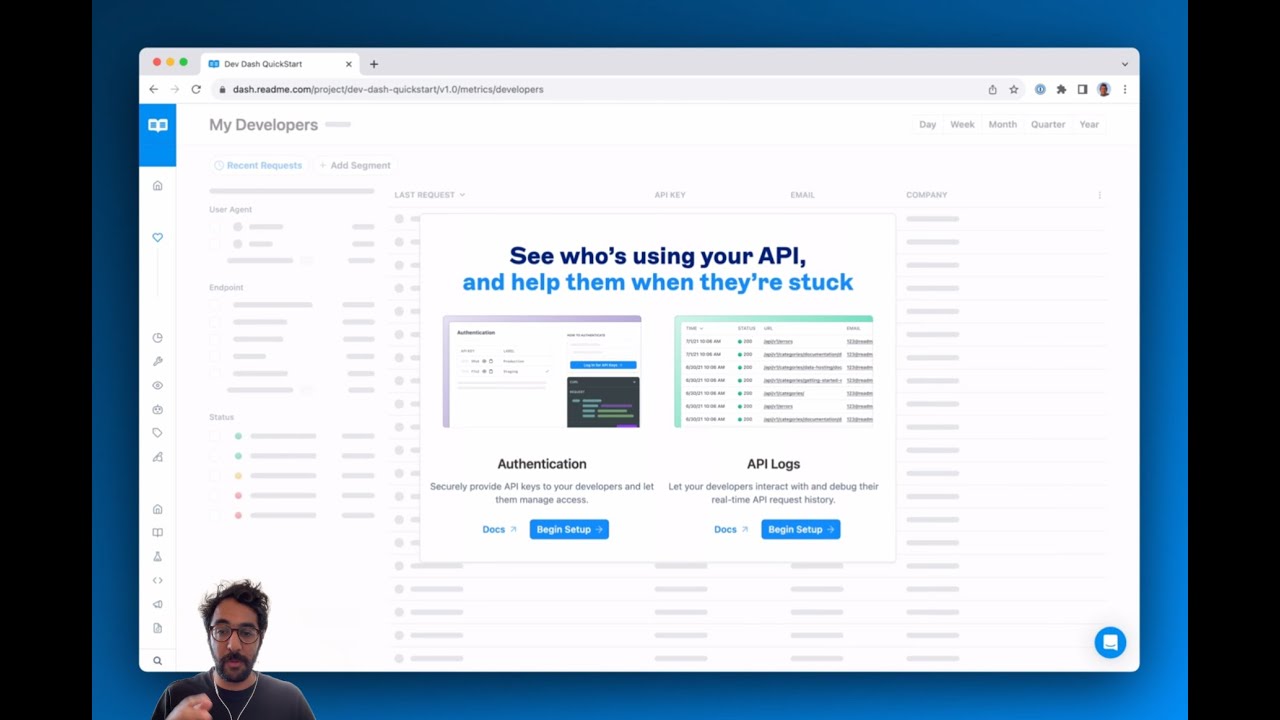
- Developer dashboard shows API request logs sent through its Metrics SDK, as shown in the demo video
- Pricing page lists LLMs.txt and an MCP server, and Ask AI as a $150 per month add-on
- Starter plan is free; Pro is $250 per month billed annually
Watch-outs
- Only 46 G2 reviews, a thin base for a tool this widely used
- Ask AI costs $150 per month on top of the plan
- Priced for API programs, not hobby projects past the free tier
ReadMe is built for a public API portal. It averages 4.5/5 on G2 across 46 reviews .
The demo shows request logs flowing into a developer dashboard, which is what lets you see how developers actually use the API. The pricing page lists a free Starter plan and Pro at $250 per month billed annually.
The review base is small, so trial it against your own spec.
Best for companies with a public API and developers to onboard. Wrong for internal-only APIs on a tight budget.
Screenshots of ReadMe 2 images
Pricing breakdown
| Plan | Price | Best for |
|---|---|---|
| Starter | $0 | Getting started, free for everyone |
| Pro | $250/mo | Teams shipping an API, billed annually |
| Enterprise | Contact sales | Larger programs |
Feature availability
| Feature | Status |
|---|---|
| Free tier | ✓ Starter |
| AI | Ask AI add-on, $150/mo |
| API logs | ✓ developer dashboard |
| Llms txt | ✓ |
| Mcp server | ✓ |
ReadMe feature availability summary: Free tier (✓ Starter), AI (Ask AI add-on, $150/mo), API logs (✓ developer dashboard), Llms txt (✓), and Mcp server (✓).
Loading reviews…
What's great
- Starter is free with 5 editor seats; Pro is $450 per month billed annually
- Docs live in Git, and the demo shows validation comments on a pull request
- An AI agent can draft docs from a Slack request, per the demo video
Watch-outs
- Only 19 G2 reviews, so there is little peer feedback
- Pro at $450 per month is the highest published price in this list
- Credits apply to AI features, with $0.01 per credit overage
Mintlify is built for developer-facing docs kept in Git. It averages 4.6/5 on G2 across 19 reviews , a very small sample.
The demo shows docs changes reviewed as pull requests, with an agent that can write docs from a request in Slack. Pro is listed at $450 per month billed annually.
Treat the rating cautiously and trial it first.
Best for startups shipping developer docs from a Git repo. Wrong for non-technical writers who want a visual editor.

Screenshots of Mintlify 3 images
Pricing breakdown
| Plan | Price | Best for |
|---|---|---|
| Starter | $0 | Individuals and small teams, 5 editor seats |
| Pro | $450/mo | Billed annually ($540 monthly), 10,000 credits a month |
| Enterprise | Custom quote | Larger teams |
Feature availability
| Feature | Status |
|---|---|
| Free tier | ✓ Starter, 5 editor seats |
| AI | Credits-based agent and assistant |
| API playground | ✓ |
| Git workflow | ✓ pull request based |
Mintlify feature availability summary: Free tier (✓ Starter, 5 editor seats), AI (Credits-based agent and assistant), API playground (✓), and Git workflow (✓ pull request based).
Loading reviews…
GitBook
Best for teams that want Git-synced API references and product docs written by engineers and non-engineersWhat's great
- Docs sites auto-generate an MCP server and include LLM optimizations, per the pricing page
- Auto-generated, interactive API docs and GitHub or GitLab sync are listed on the Free plan page
- Essential $65 and Ultimate $249 per site per month, billed annually
Watch-outs
- Priced per site, and extra team members cost $12 each per month
- Less specialist than Redocly or Stoplight for strict OpenAPI governance
- Several roundups that rank GitBook highly are written by GitBook itself
GitBook sits between a knowledge base and a developer portal. It averages 4.7/5 on G2 across 208 reviews .
The pricing page lists Git sync, interactive API docs generated from a spec, preview deployments and an auto-generated MCP server.
It will not govern a large OpenAPI estate the way Stoplight can.
Best for product teams whose API docs share a site with guides. Wrong for enterprises that need design-first governance.

Screenshots of GitBook 3 images
Pricing breakdown
| Plan | Price | Best for |
|---|---|---|
| Free | $0 | Individuals |
| Essential | $65/site/mo | Public, branded docs sites |
| Ultimate | $249/site/mo | Larger docs programs; extra team members $12/user/mo |
Feature availability
| Feature | Status |
|---|---|
| Free tier | ✓ individuals |
| Github gitlab sync | ✓ |
| Interactive API docs | ✓ |
| Mcp server | ✓ auto-generated |
GitBook feature availability summary: Free tier (✓ individuals), Github gitlab sync (✓), Interactive API docs (✓), and Mcp server (✓ auto-generated).
Loading reviews…
Document360
Best for API docs that live beside guides, tutorials and a help center in one governed knowledge baseWhat's great
- Dedicated API documentation solution page on the vendor site, alongside versioning, workflow and analytics
- One knowledge base can hold API reference, how-to guides and release notes, with approvals before anything publishes
- SOC 2 Type II, ISO 27001:2022 and GDPR are listed on the pricing page
Watch-outs
- It is a knowledge base first, so the interactive try-it consoles that ReadMe and Redocly are known for are not what you buy it for
- Quote-based pricing, so you need a sales conversation to compare cost
- It is a pick for mixed content, not API-only portals
Document360 is the pick when API reference is one part of a larger documentation set. It averages 4.7/5 on G2 across 557 reviews .
Its site has a dedicated API documentation page , and the platform adds the governance an API-only tool often lacks: roles, approval workflow, version history and analytics on what readers search for.
The trade-off is focus. If your docs are almost all OpenAPI reference with a try-it console, a specialist will fit better. ReadMe, Mintlify and Redocly are built for that case.
Best for SaaS teams whose API docs sit beside customer guides. Wrong for an API-first company that needs a developer portal with live request consoles.
Screenshots of Document360 4 images
Pricing breakdown
| Plan | Price | Best for |
|---|---|---|
| Custom plan | Custom quote | Pricing is built around your setup through a short intake form |
Security & compliance
| Standard | Availability |
|---|---|
| GDPR | Yes |
| Iso27001 | Yes |
| SOC 2 Type II | Yes |
| SSO / SAML | Yes |
Document360 compliance summary: GDPR is yes, iso27001 is yes, SOC 2 Type II is yes, and SSO / SAML is yes.
Feature availability
| Feature | Status |
|---|---|
| Free tier | ✗ Demo / custom quote |
| AI | ✓ AI search, chatbot, writing agent, MCP server |
| Analytics | ✓ |
| Import pdf word | ✓ |
| Mermaid diagrams | ✓ |
| Seo | ✓ |
| Ticket deflector | ✓ |
| Workflow | ✓ |
Document360 feature availability summary: Free tier (✗ Demo / custom quote), AI (✓ AI search, chatbot, writing agent, MCP server), Analytics (✓), Import pdf word (✓), Mermaid diagrams (✓), Seo (✓), Ticket deflector (✓), and Workflow (✓).
Loading reviews…
What's great
- Built for the case where the OpenAPI spec is the source of truth
- The demo shows detailed request schemas, error responses and response samples rendered from a spec
- Pro is $249 per month billed annually, with unlimited pages
Watch-outs
- G2 shows a single review, so there is no meaningful rating
- Extra sites cost $390 a year each
- Scale at $729 per month is where SSO appears
Redocly renders an OpenAPI spec into reference docs with schemas, error cases and samples. G2 lists 1 reviews , which is too few to rate, so we lean on its pricing page and demo instead.
Pro is $249 per month billed annually, and Scale is $729 per month.
Best for teams with a well-kept OpenAPI spec and a Git and CI workflow. Wrong if you want guides and a help center in the same tool.

Screenshots of Redocly 3 images
Pricing breakdown
| Plan | Price | Best for |
|---|---|---|
| Pro | $249/mo | Teams shipping an API and its docs, billed annually as $2,988 |
| Scale | $729/mo | Rolling docs out across teams, billed annually as $8,748 |
Feature availability
| Feature | Status |
|---|---|
| Extra sites | $390/yr each |
| Openapi reference | ✓ |
| SSO | Scale plan |
| Unlimited pages | ✓ |
Redocly feature availability summary: Extra sites ($390/yr each), Openapi reference (✓), SSO (Scale plan), and Unlimited pages (✓).
Loading reviews…
What's great
- Style guide rulesets and linting of API definitions are shown in the demo video
- Published price ladder: $44, $113 and $362 per month, billed annually
- 4.4/5 on G2 across 341 reviews
Watch-outs
- Documentation is one part of a design and governance platform
- Extra users cost $11 to $22 each per month
- Roundups note SmartBear acquired Stoplight in 2023, so check its roadmap
Stoplight starts from API design, with documentation as an output. It averages 4.4/5 on G2 across 341 reviews .
The demo shows style guides and linting that flag missing operation IDs and tags, which suits teams standardizing many APIs.
Best for platform teams governing APIs across an organization. Wrong if you only need a polished public reference.

Screenshots of Stoplight 3 images
Pricing breakdown
| Plan | Price | Best for |
|---|---|---|
| Basic | $44/mo | Designing an API as an individual, billed annually ($56 monthly) |
| Startup | $113/mo | Small teams, billed annually ($147 monthly) |
| Pro Team | $362/mo | Governing APIs across an organization, billed annually ($453 monthly) |
| Enterprise | Custom quote | Large organizations |
Feature availability
| Feature | Status |
|---|---|
| Design first | ✓ |
| Extra users | $11 to $22 each, by plan |
| Linting | ✓ |
| Style guides | ✓ |
Stoplight feature availability summary: Design first (✓), Extra users ($11 to $22 each, by plan), Linting (✓), and Style guides (✓).
Loading reviews…
Postman
Best when your API collections already live in Postman and you want to publish them as docsWhat's great
- Collections publish as documentation with code samples, as shown in the demo video
- Free plan; Solo $9 per month and Team $19 per user per month, billed annually
- 4.6/5 on G2 across 1,801 reviews, the biggest base here
Watch-outs
- Docs are a feature of an API platform, not its focus
- Less control over design and navigation than a docs-first tool
- AI credits are metered, with overage priced per credit
Postman turns the collections your team already tests with into published docs. It averages 4.6/5 on G2 across 1,801 reviews .
The demo walks through publishing a collection with a custom domain and styling options. Pricing starts free, with Team at $19 per user per month billed annually.
Best for teams already living in Postman. Wrong for a branded developer portal.

Screenshots of Postman 3 images
Pricing breakdown
| Plan | Price | Best for |
|---|---|---|
| Free | $0 | Individuals building and testing APIs |
| Solo | $9/mo | Individuals who want more AI and automation, billed annually |
| Team | $19/user/mo | Teams building and shipping APIs together, billed annually |
Feature availability
| Feature | Status |
|---|---|
| Free tier | ✓ |
| AI credits | 100 on Free |
| API testing | ✓ |
| Published docs | ✓ from collections |
Postman feature availability summary: Free tier (✓), AI credits (100 on Free), API testing (✓), and Published docs (✓ from collections).
Loading reviews…
Swagger Studio
Best for teams standardized on OpenAPI who want editing, preview and collaboration in one placeWhat's great
- Editor with live rendered preview of the OpenAPI definition, as shown in the demo
- Inline comments for collaborating on a definition
- 4.5/5 on G2 across 197 reviews
Watch-outs
- We could not find a list price on the page we checked
- G2 now lists the product as Swagger Studio, so older reviews may use the SwaggerHub name
- The demo UI looks dated next to newer tools
SwaggerHub, now listed as Swagger Studio on G2, is the established OpenAPI tool. It averages 4.5/5 on G2 across 197 reviews .
The demo shows a definition on the left and a rendered library API on the right, with a comments panel for review.
Best for teams built around the OpenAPI ecosystem. Wrong if you want polished public docs with minimal setup.

Screenshots of Swagger Studio 2 images
Pricing breakdown
| Plan | Price | Best for |
|---|---|---|
| See vendor pricing | Not listed on the page we checked | Check swagger.io for current plans |
Feature availability
| Feature | Status |
|---|---|
| Comments | ✓ |
| Live preview | ✓ |
| Openapi editor | ✓ |
Swagger Studio feature availability summary: Comments (✓), Live preview (✓), and Openapi editor (✓).
Loading reviews…
Tools we considered but excluded
We evaluated more tools than the 8 you see above. These did not make the cut. Saying what we rejected, and why, is the editorial muscle most listicles skip.
- Scalar: Open-source-friendly, but G2 shows no rating we could use
- Fern: Recommended for docs plus SDK generation, but G2 shows one review
- Docusaurus: Free, open-source and self-hosted; no vendor listing to rate or price
Honorable mentions
Solid tools that did not crack the main list but are worth tracking, especially for niche use cases.
- Bump.sh: Built for API changelogs and version diffs
- Scalar: Open-source-friendly API reference with a built-in client; worth a trial
A developer opens your docs to answer one question: how do I authenticate and make my first call? Everything else is secondary.
Match the tool to the reader
- External developers: you need an interactive try-it console, request logs and a polished portal. ReadMe, Mintlify and Redocly lead here.
- Internal engineers: you need design and governance. Stoplight and Swagger Studio fit.
- Customers who also need guides: you want API reference next to how-to articles. Document360 and GitBook fit.
What to test in a trial
- Does your own OpenAPI spec render accurately, including schemas and error responses?
- Can readers send a real request from the docs?
- Is there a Git workflow and a review step before publishing?
- Does the tool expose content to AI assistants through llms.txt or an MCP server?
Our pick
ReadMe leads for API-first companies that need a public developer portal with request logs and an interactive console. Mintlify and Redocly are strong for docs-as-code and OpenAPI-first teams. Document360 is the pick when API docs are part of a bigger documentation set, adding approvals, versioning and analytics.
Frequently asked questions
What is the best API documentation software?
It depends on the goal. ReadMe ranks first here for an interactive developer portal, with Mintlify and Redocly built for docs-as-code and OpenAPI-first reference. Document360, rated 4.7/5 on G2 across 557 reviews, fits API docs that sit beside guides in one governed knowledge base.
Do I need a separate tool for API reference?
Not always. Document360 and GitBook can hold API reference next to guides. A specialist such as ReadMe or Redocly adds interactive consoles and tighter OpenAPI rendering.
How much does API documentation software cost?
From vendor pricing pages in November 2026: ReadMe Pro is $250 per month, Redocly Pro is $249 per month, Mintlify Pro is $450 per month, GitBook Essential is $65 per site per month, Stoplight starts at $44 per month, and Postman Team is $19 per user per month. Document360 is quote-based.
Can I generate API docs from an OpenAPI spec?
Yes. Redocly, ReadMe, Mintlify, Stoplight, Swagger Studio and GitBook all render reference docs from a spec. Check that your spec renders accurately, including schemas and error responses.
What does MCP support mean for API docs?
An MCP server lets AI assistants query your docs directly. ReadMe and GitBook list one, and Document360 has an MCP server page.
Is there a free API documentation tool?
Yes. ReadMe, Mintlify, GitBook and Postman have free plans, and Docusaurus and Swagger UI are open source. Free plans cap seats, projects or published versions.
Related helpful reads
Write a review
Posts to the page right away. Keep it real — no links or email addresses.