

Comparing the best SOP Software of 2026 includes 1. Scribe 2. Trainual 3. Process Street 4. Document360 5. Whale 6. Tango 7. SweetProcess.
TL;DR
- Scribe: best overall for capturing software SOPs automatically. 4.8/5 on G2 across 1,009 reviews.
- Trainual: best for onboarding and training. 4.7/5 across 1,094 reviews.
- Process Street: best for SOPs run as checklists. 4.6/5 across 463 reviews.
- Document360: best for governed SOP documentation. G2 4.7/5 across 557 reviews.
- Whale: best for AI-assisted SOPs, free for 1 creator.
A desk-research comparison of seven SOP tools, split by what you actually need: governed documentation, screen-captured guides, onboarding and training, or checklists your team executes. Rankings rest on G2 ratings and vendor pricing. Scribe leads overall, and Document360 fits SOPs stored in a governed knowledge base.
What is SOP software?
SOP software helps teams write, organize, distribute and maintain standard operating procedures so work gets done the same way each time.
There are two jobs: SOP documentation (writing and storing procedures) and SOP execution (running them as checklists with owners and due dates). Few tools do both well.
Best SOP Software comparison: features, pricing and verdicts
| Tool | Best for | Starting price | Free trial | External rating |
|---|---|---|---|---|
Best for capturing software SOPs automatically as you click through a workflow | $13/seat/mo | See vendor site | G2 4.8/5 (1,009 reviews) | |
Best when SOPs are part of formal onboarding with completion tracking | Quote-based | Demo | G2 4.7/5 (1,094 reviews) | |
Best when an SOP must be run as an assigned, auditable checklist every time | See vendor pricing | See vendor site | G2 4.6/5 (463 reviews) | |
Best when SOPs belong in the same governed knowledge base as the rest of company documentation | Custom quote | Demo | G2 4.7/5 (557 reviews) | |
Best for AI-assisted SOP creation with a free plan for one creator | $0 | Free plan | G2 4.8/5 (214 reviews) | |
Best for quick screenshot-based guides with embeds into other tools | $15/user/mo | Free plan | G2 4.7/5 (547 reviews) | |
Best-known dedicated SOP library for small teams, though its G2 sample is tiny | See vendor pricing | See vendor site | G2 4.3/5 (5 reviews) |
How we chose these tools
This page is desk research. We read the live G2 listings, vendor pricing pages and published product material, and we did not run hands-on trials of these products. We used US Google results, ChatGPT and Perplexity only to find candidate tools; the ranking rests on G2 ratings, review counts, vendor pricing and product material. Ratings and review counts are as shown on G2 in November 2026 and can change; prices are from each vendor’s pricing page on the same date, and where we could not find a list price we say so. The frame is need first: governed documents, automatic capture, training, or execution.
Read the full CEOPickz.com research approach, including how desk-research pages and the editorial score work.
Detailed SOP Software reviews
What's great
- Captures browser, desktop and mobile workflows into step-by-step guides, per the demo
- Share by link, Smart Embed or export, with a toggle for search engine visibility
- Pro Team is $13 per seat per month billed annually; 4.8/5 on G2 across 1,009 reviews
Watch-outs
- Pro Team needs a 5-seat minimum
- Captures what you click, not why or who approves it
- Not a place to govern a large SOP library
Scribe turns a recorded workflow into a click-by-click guide. It averages 4.8/5 on G2 across 1,009 reviews .
The demo shows the capture menu, the step editor and sharing options. Pro is $25 and Pro Team is $13 per seat per month billed annually, with Team starting at 5 seats.
Best for SOPs about software tasks. Wrong for physical or judgment-heavy procedures.

Screenshots of Scribe 3 images
Pricing breakdown
| Plan | Price | Best for |
|---|---|---|
| Pro | $25/seat/mo | From 1 seat, billed annually ($35 monthly) |
| Pro Team | $13/seat/mo | From 5 seats, billed annually ($17 monthly) |
Feature availability
| Feature | Status |
|---|---|
| Capture | Browser, desktop and mobile |
| Pages | ✓ multi-guide pages |
| Share | Link, Smart Embed and Export |
Scribe feature availability summary: Capture (Browser, desktop and mobile), Pages (✓ multi-guide pages), and Share (Link, Smart Embed and Export).
Loading reviews…
What's great
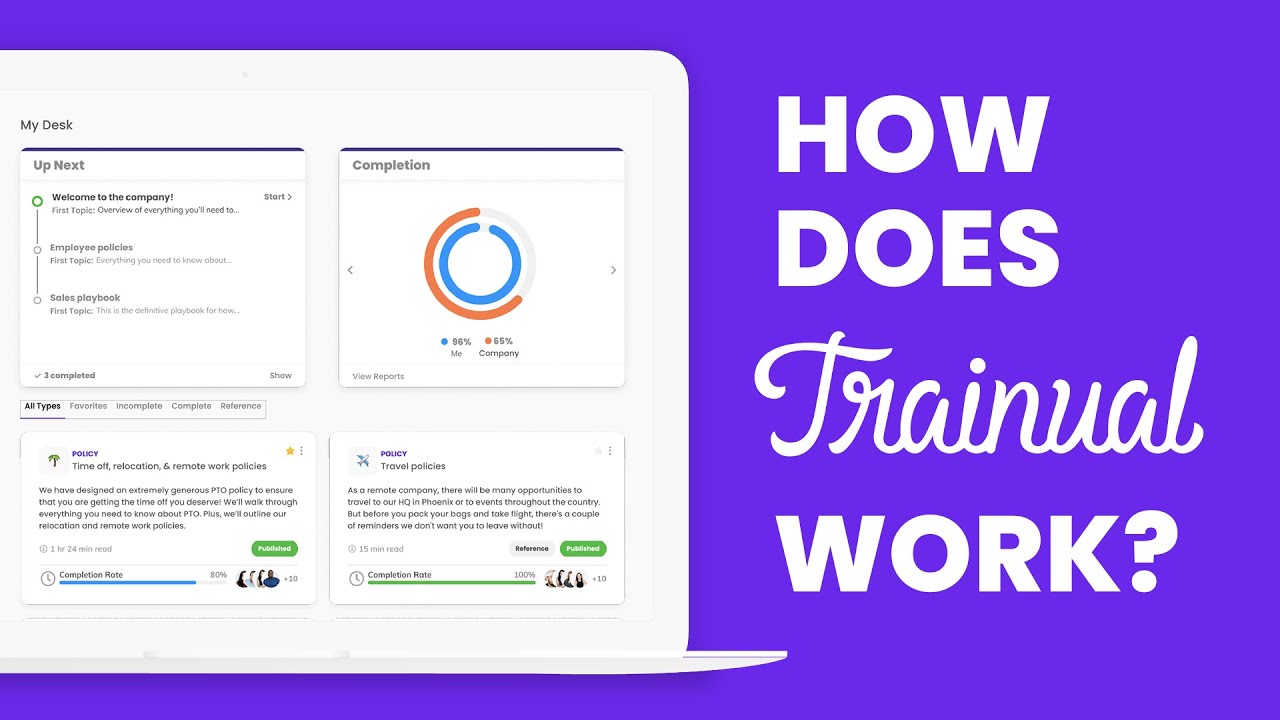
- People report lists subjects assigned, completion percentage and role, as shown in the demo
- My Desk shows each person what is up next and their completion
- 4.7/5 on G2 across 1,094 reviews
Watch-outs
- Quote-based, with a one-time $1,000 implementation fee per the pricing page
- Heavier than a simple SOP library
- Aimed at onboarding, less at live checklists
Trainual is built around training people on procedures. It averages 4.7/5 on G2 across 1,094 reviews .
The demo shows assigned subjects, progress and a completion report by person.
Best for growing teams onboarding new hires. Wrong for teams that only need a procedure library.
Screenshots of Trainual 3 images
Pricing breakdown
| Plan | Price | Best for |
|---|---|---|
| Custom | Quote-based | A one-time $1,000 implementation fee applies, per the pricing page |
Feature availability
| Feature | Status |
|---|---|
| Free tier | ✗ |
| Completion tracking | ✓ people report |
| Onboarding | ✓ |
| Policies and processes | ✓ |
Trainual feature availability summary: Free tier (✗), Completion tracking (✓ people report), Onboarding (✓), and Policies and processes (✓).
Loading reviews…
What's great
- Runs workflows as checklists with assignees and due dates, per the demo
- Forms and pages sit inside workflows
- 4.6/5 on G2 across 463 reviews
Watch-outs
- We could not find a list price on the page we checked
- Better at running processes than storing a document library
- Long setup for complex workflows
Process Street runs SOPs as checklists. It averages 4.6/5 on G2 across 463 reviews .
The demo shows a client onboarding run with assigned tasks, due dates and form fields.
Best for repeatable processes that need accountability. Wrong for reference-style SOP libraries.

Screenshots of Process Street 3 images
Pricing breakdown
| Plan | Price | Best for |
|---|---|---|
| See vendor pricing | No list price on the page we checked | The pricing page mentions discounts for businesses under 15 employees and $2 million in revenue |
Feature availability
| Feature | Status |
|---|---|
| Forms | ✓ |
| Pages | ✓ |
| Task assignment | ✓ |
| Workflows | ✓ |
Process Street feature availability summary: Forms (✓), Pages (✓), Task assignment (✓), and Workflows (✓).
Loading reviews…
Document360
Best when SOPs belong in the same governed knowledge base as the rest of company documentationWhat's great
- Approval workflow, revision history and role-based access suit SOPs that must be signed off
- One searchable knowledge base for SOPs, policies and customer docs, with analytics on what staff search
- It has a dedicated SOP solution page on the vendor site
Watch-outs
- It stores and governs SOPs but does not run them as checklists the way Process Street does
- No built-in quizzes or training tracking like Trainual
- Quote-based pricing
Document360 is the pick when SOPs are documents that need governance. It averages 4.7/5 on G2 across 557 reviews .
It gives SOPs the same approval workflow, versioning and permissions as the rest of your documentation, and its analytics show which procedures staff search for and cannot find.
The trade-off is execution. SweetProcess, Trainual and Process Street are stronger at executing, tracking and training.
Best for teams that want SOPs inside a governed knowledge base. Wrong when SOPs must be executed as assigned checklists or tied to onboarding quizzes.
Screenshots of Document360 4 images
Pricing breakdown
| Plan | Price | Best for |
|---|---|---|
| Custom plan | Custom quote | Pricing is built around your setup through a short intake form |
Security & compliance
| Standard | Availability |
|---|---|
| GDPR | Yes |
| Iso27001 | Yes |
| SOC 2 Type II | Yes |
| SSO / SAML | Yes |
Document360 compliance summary: GDPR is yes, iso27001 is yes, SOC 2 Type II is yes, and SSO / SAML is yes.
Feature availability
| Feature | Status |
|---|---|
| Free tier | ✗ Demo / custom quote |
| AI | ✓ AI search, chatbot, writing agent, MCP server |
| Analytics | ✓ |
| Import pdf word | ✓ |
| Mermaid diagrams | ✓ |
| Seo | ✓ |
| Ticket deflector | ✓ |
| Workflow | ✓ |
Document360 feature availability summary: Free tier (✗ Demo / custom quote), AI (✓ AI search, chatbot, writing agent, MCP server), Analytics (✓), Import pdf word (✓), Mermaid diagrams (✓), Seo (✓), Ticket deflector (✓), and Workflow (✓).
Loading reviews…
What's great
- Free forever for 1 creator and up to 10 members; Scale is $299 per month billed yearly
- CoPilot answers questions from your procedures, as shown in the demo
- 4.8/5 on G2 across 214 reviews
Watch-outs
- Advance at $599 per month is the tier for onboarding at scale
- Extra creators cost $39 per month on Advance
- Newer product with fewer reviews than Scribe or Trainual
Whale pairs a procedure library with an AI assistant. It averages 4.8/5 on G2 across 214 reviews .
The free plan allows 1 creator and 10 members, and Scale is $299 per month billed yearly.
Best for small teams that want SOPs plus Q&A over them. Wrong for teams needing deep workflow automation.

Screenshots of Whale 3 images
Pricing breakdown
| Plan | Price | Best for |
|---|---|---|
| Free | $0 forever | Trying Whale with a small team, 1 creator and up to 10 members |
| Scale | $299/mo | Putting every process in one place, billed yearly |
| Advance | $599/mo | Onboarding and training at scale, 5 creators included, billed yearly |
| Enterprise | Custom | Larger organizations |
Feature availability
| Feature | Status |
|---|---|
| Free tier | ✓ 1 creator, 10 members |
| AI assistant | ✓ CoPilot and Ask |
| Extra creators | $39/mo billed yearly on Advance |
Whale feature availability summary: Free tier (✓ 1 creator, 10 members), AI assistant (✓ CoPilot and Ask), and Extra creators ($39/mo billed yearly on Advance).
Loading reviews…
What's great
- Free plan; Pro Team is $15 per user per month billed annually for 3+ users
- Embeds into Confluence, Guru, Notion, SharePoint and more, per the demo
- 4.7/5 on G2 across 547 reviews
Watch-outs
- Captures clicks, not approvals or training
- Pro for 1 to 2 users is $22 monthly
- Overlaps with Scribe
Tango captures a workflow into a guide. It averages 4.7/5 on G2 across 547 reviews .
The demo shows capture, a guide editor and embedding options.
Best for visual how-to guides. Wrong as a governed SOP library.

Screenshots of Tango 3 images
Pricing breakdown
| Plan | Price | Best for |
|---|---|---|
| Free | $0 | Create and share your first guides |
| Pro | $22/user/mo | 1 to 2 users |
| Team (3+ users) | $15/user/mo | Billed annually, per the pricing page |
Feature availability
| Feature | Status |
|---|---|
| Free tier | ✓ |
| Capture | ✓ browser extension |
| Embed | Confluence, Guru, Notion, SharePoint and more |
| Export | ✓ |
Tango feature availability summary: Free tier (✓), Capture (✓ browser extension), Embed (Confluence, Guru, Notion, SharePoint and more), and Export (✓).
Loading reviews…
What's great
- Built specifically for SOP libraries
- Procedures, policies and task tracking in one tool
- Procedures show a numbered checklist on desktop and mobile
Watch-outs
- G2 lists only 5 reviews, so the 4.3/5 rating is not reliable
- We could not confirm the price on the vendor page; roundups disagree
- Less polished than newer tools
SweetProcess is a dedicated SOP library aimed at small teams. G2 lists 5 reviews , too few to trust the 4.3/5.
The demo shows procedures as checklists.
Best for small teams building an SOP library. Wrong if you need independent proof of quality.

Screenshots of SweetProcess 2 images
Pricing breakdown
| Plan | Price | Best for |
|---|---|---|
| See vendor pricing | Not listed on the page we checked | Third-party roundups disagree on the price, so confirm it on the vendor site |
Feature availability
| Feature | Status |
|---|---|
| Approvals | ✓ |
| Policies | ✓ |
| Procedures | ✓ |
| Task tracking | ✓ |
SweetProcess feature availability summary: Approvals (✓), Policies (✓), Procedures (✓), and Task tracking (✓).
Loading reviews…
Tools we considered but excluded
We evaluated more tools than the 7 you see above. These did not make the cut. Saying what we rejected, and why, is the editorial muscle most listicles skip.
- Waybook: A newer SOP library, but G2 shows a single review
- Notion: A general wiki; covered in our internal knowledge base guide
Honorable mentions
Solid tools that did not crack the main list but are worth tracking, especially for niche use cases.
- Waybook: An SOP library with training; Core is $99 per month for 20 seats
- SafetyCulture: 4.6/5 on G2 across 486 reviews; better for inspections and audits than documents
- Guidde: 4.8/5 on G2 across 97 reviews; video-first how-to guides
Most SOP libraries fail because nobody can find the procedure, or nobody follows it. Choose by the job you are solving.
Pick by need
- Governed SOP library: Document360.
- Create SOPs from screen recordings: Scribe or Tango.
- Onboarding and training: Trainual or Whale.
- Daily execution with checklists: Process Street.
Pick by team size
- 1 to 10: Whale free, Tango free, or Scribe.
- 10 to 50: Trainual, Process Street or Whale Scale.
- 50+: Document360 for governance, with Process Street for execution.
Our pick
Scribe leads because most SOPs describe software tasks and it captures them automatically. Trainual is the pick for onboarding and Process Street for checklists you execute. Document360 fits when SOPs need approvals and an audit trail.
Frequently asked questions
What is the best SOP software?
It depends on the job. Scribe ranks first here for capturing software SOPs automatically, with Trainual for onboarding and Process Street for checklists you execute. Document360 ranks fourth, as the pick for SOPs stored in a governed knowledge base, at 4.7/5 on G2 across 557 reviews. SweetProcess is popular but has few G2 reviews.
What is the difference between SOP documentation and SOP execution?
Documentation writes and stores the procedure. Execution runs it as a checklist with owners and due dates. Scribe and Document360 document; Process Street executes; Trainual trains.
Which SOP tool is best for onboarding?
Trainual, which tracks completion by person, per its demo.
How much does SOP software cost?
From vendor pages in November 2026: Whale has a free plan and Scale at $299 per month, Scribe Pro Team is $13 per seat per month, Tango Pro Team is $15 per user per month, and Trainual is quote-based with a $1,000 implementation fee. Document360 is quote-based.
Can I make SOPs automatically from screen recordings?
Yes. Scribe and Tango capture a workflow into a step-by-step guide.
Which SOP tool is best for small teams?
Whale has a free plan for 1 creator and 10 members, and Tango has a free plan. SweetProcess is popular but has few G2 reviews.
Related helpful reads
Write a review
Posts to the page right away. Keep it real — no links or email addresses.